You Cannot Query a Feeling: The Art of Personal Data Ingestion
Greetings,
I hope you are doing well.
I have taken a bit more time than usual to complete this article. I realized that to bridge the gap between rigorous data science and the messy reality of daily life, I needed a structure that was robust enough for an engineer but simple enough to maintain on a busy Tuesday night.
The goal was to build a vision — a step-by-step system that works as well for you as it does for me.
This article kicks off the Ingest Layer. We will start by breaking down the core concepts of data ingestion: why it matters and the rules of good data. Then, we will translate those concepts into Life & System Design. Finally, I will unveil the project we are building together (Spoiler: It starts with a Google Sheet).
Let’s begin with the theory.
Press enter or click to view image in full size
The Concepts: The Rules of the Game
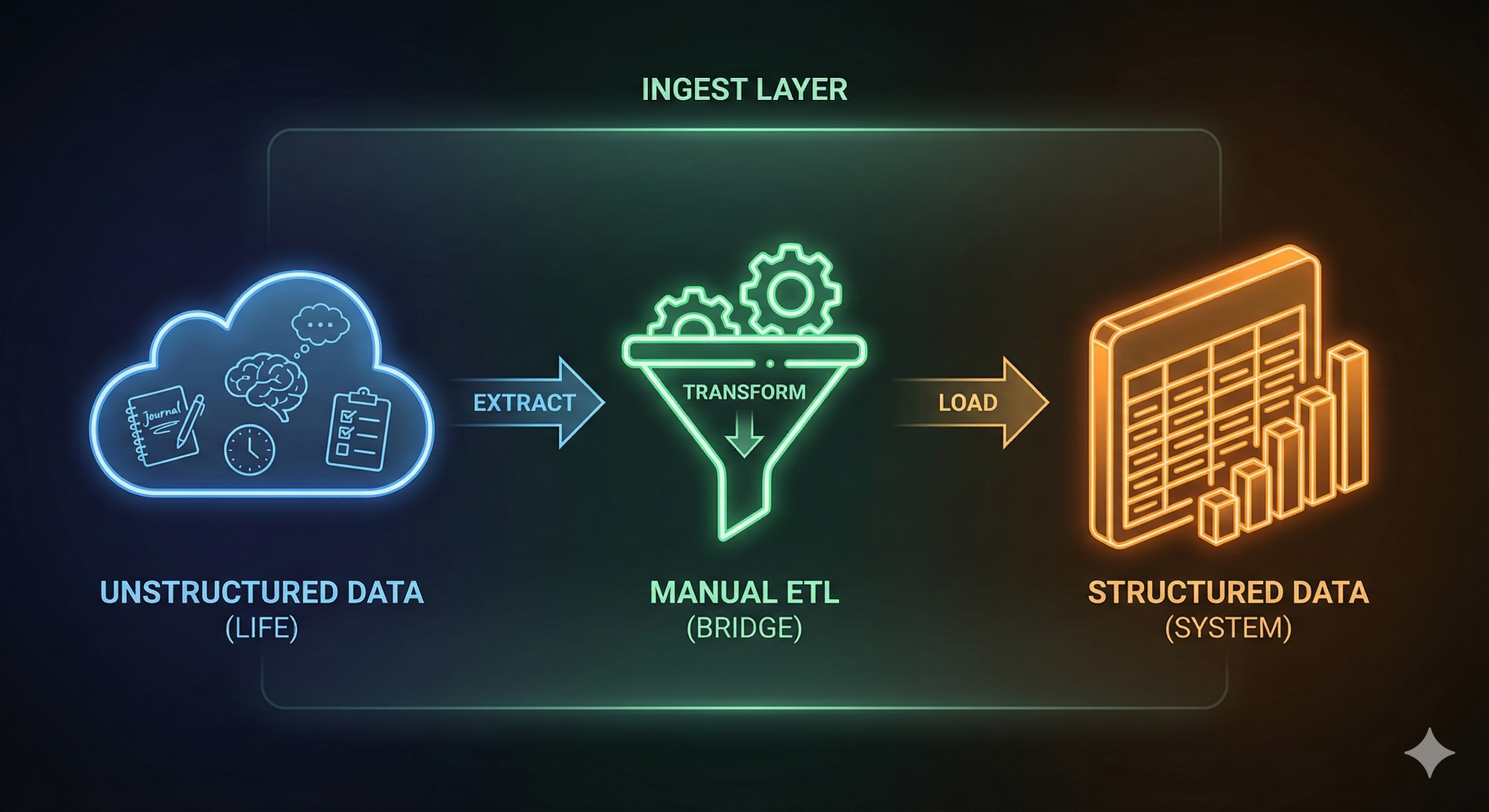
Before we build our tracker, we must understand the engineering principles behind it. In Data Science, “Ingestion” isn’t just writing things down; it is the process of collecting raw information, validating it, and structuring it for storage.
Here are the four concepts that define this layer:
Structured vs. Unstructured Data
Data exists in two primary forms.
Unstructured Data:
Free text, journal entries, “brain dumps,” and images. This is rich in context but difficult to measure mathematically.
Structured Data:
Information that fits neatly into rows and columns (Numbers, Dates, Categories). This is easy to analyze but lacks nuance.
A good personal system needs both, but the golden rule is: never mix them. You cannot query a feeling, and you cannot “feel” a spreadsheet row.
The Schema & Validation
A Schema is the blueprint of your database. It defines exactly what data is allowed to enter the system. If a column expects a Date, you cannot write “Yesterday.” If a column expects an Integer (Active Minutes), you cannot write “A long walk.” This is called Data Validation. Strict schemas prevent errors downstream when we try to visualize our progress.
The ETL Pipeline
This is the industry standard for moving data. It stands for:
Extract:
Pulling data from the source (e.g., your memory or your journal).
Transform:
Cleaning or converting it (e.g., turning “I felt pretty good” into the number
4).Load:
Placing it into the storage destination (the Database).
GIGO (Garbage In, Garbage Out)
This is the most important rule. The most sophisticated AI model in the world cannot find insights if the input data is wrong, inconsistent, or fake. The Ingest layer is about discipline, not complex code.
The Philosophy: Two Brains, One System
Most personal tracking attempts fail because we try to force everything into one tool. We try to journal in a spreadsheet (which is messy) or track metrics in a diary (which is un-trackable).
To solve this, we will use a “Two-System” Architecture:
The Operational Log (The Source):
This is where you live. It is your daily journal, your task list, and your brain dump. It handles Unstructured Data
The Analytical Database (The Destination):
This is where you measure. It is a strict table of numbers and tags. It handles Structured Data
The magic happens in the bridge between them. We are not going to automate the connection yet. We are going to perform a “Manual ETL”. Every night, you will look at your Operational Log, extract the metrics, and load them into the Database.
Why manual? Because the friction is the point. Manually typing “0” for exercise forces you to acknowledge it. It builds awareness before we build automation.
The Project: Building the Ingest Layer
Now, let’s build the system. You will need your preferred note-taking app (Capacities, Notion, Obsidian, or a Notebook) and Google Sheets.
Part 1: The Source (The Operational Template)
In your daily note-taking app, you need a space to work. You can use your own format, but I recommend adding a specific “Evening Checkout” section at the bottom. This acts as the “Staging Area” for your data.
Here is the template I use. You can copy this into Capacities, Notion, or Obsidian:
# Date
### Anchor: Why Not Me? Fix the Now. Refine the Rest.
**Future Snapshot (3 Years):** _(What is one specific thing you see/smell/feel in your ideal future morning?)_
### Journal
### Operation
#### Core Task - [ ]
#### Moderate Tasks - [ ] - [ ]
#### Habit - [ ] Exercise (60m) - - [ ] Write (1000 words) - - [ ] Code (60m) - - [ ] Read (30m) - - [ ] Learn (30m) - - [ ] Job Action -
#### Mission - [ ] 30 Days - [ ] Dream 2027---
### Evening Check-out
#### **The Win Log (3 Small Wins):** 1. 2. 3.
#### **The Variable Check:** - **Stuck Point:** _(Where did friction happen?)_-
**Variable Tweak:** _(What one small thing will I change tomorrow? e.g., "Put phone in drawer")_
Part 2: The Destination (The Schema)
Now, we set up the Analytical Database. As mentioned, we are using Google Sheets because it creates clean, structured data that is easy to export for the engineering phase later.
To save you time, I have pre-built the entire environment with the correct Data Types, Validation Rules, and Formulas.
While you don’t need to build it from scratch, you do need to understand The Schema. If you don’t understand what data the system expects, you will break the pipeline.
Here is the breakdown of the columns in your new template:
Date
(
Date) The Index. Format:YYYY-MM-DDTasks_Done
(
Integer) Pure count of completed tasks (e.g.,5).Deep_Work
(
Decimal) Hours spent in flow (e.g.,1.5).Active_Mins
(
Integer) Minutes of exercise. 0 if none.Read_Mins
(
Integer) Minutes of reading. 0 if none.Energy
(
Integer) Dropdown:1(Low) to5(High).Mood
(
Category) Dropdown: Great, Good, Neutral, Bad.Stress_Source
(
Multi-Select) Dropdown: Work, Health, Social, Finance.Daily_Win
(
Text) Constraint: Limit to 1 short sentence.Blocker
(
Text) Constraint: Limit to 1 short sentence.Day_Score
(
Formula) Calculated Automatically (Do not edit).
The Gamification Engine (Column K)
You will notice the Day_Score column fills itself in automatically. I have programmed a simple algorithm to give you immediate feedback on your day.
The current formula calculates a score out of 10:
=MIN(10, Tasks + Energy + (Bonus for >30m Activity) + (Bonus for >15m Reading))
Note: Since this is your system, feel free to edit this formula in the template if you value Reading more than Activity, or want to weight Deep Work higher!
The Workflow
This is your new ritual. It takes less than 60 seconds.
Live your day using the Operational Log. Check off habits, write your journal, and wrestle with your tasks.
At night, scroll to the bottom of your note to the Evening Checkout.
Extract: Count the checks. Assess your mood. Fill in the mini-form in your text editor.
Load: Open your Google Sheet. Create a new row. Type in the numbers. Watch the
Day_Scorecalculate automatically.
Conclusion
You now have a functioning Ingest Layer.
You have separated your “Life” (the unstructured mess of doing) from your “Data” (the structured clarity of measuring).
Right now, this is just a spreadsheet. But you are building a dataset. In the next article, The Engineer Layer, we will export this data and utilize Python to find patterns you didn’t know existed. We will turn this static table into a dynamic analysis of your life. I will also include a snapshot of my own ingest layer!
For now, set up your Sheet, and log your first entry.
Until next time.